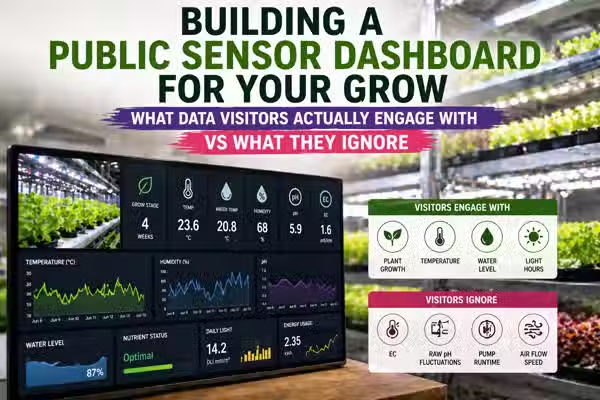
Key takeaways
Temperature and a live or timelapse camera are the two elements visitors engage with on a public grow dashboard — everything else is background noise unless the visitor has growing experience themselves.
EC and pH readings on a public dashboard produce near-zero engagement from non-grower visitors. Most cannot interpret the numbers and do not click through to find out what they mean.
A single well-labeled 'days since seeding' progress indicator outperforms a multi-chart sensor panel for general audience engagement — it gives context that raw numbers cannot.
Dashboards that show a current tray image alongside one live temperature reading get longer average visit durations than dashboards showing six simultaneous sensor charts with no visual anchor.
Grower-to-grower engagement behaves differently: experienced visitors spend more time on humidity trend charts and lux readings than on any other data type.
Public dashboard design should solve two different problems: making a non-grower feel something, and giving an experienced grower something to check. Most dashboards try to do both at once and succeed at neither.
TL;DR
A public sensor dashboard for your grow is not the same thing as your internal monitoring panel. Visitors do not care about EC drift or moisture percentage — they care about whether something is alive and growing, and they want to see it. Temperature with context, a camera, and a progress indicator will do more for visitor engagement than twelve real-time charts. The mistake almost every grower makes is building the dashboard for themselves and then calling it public.
The dashboard nobody looked at
The first public-facing version of the Plant Mood sensor dashboard went live with everything: temperature, humidity, lux, EC, pH, moisture percentage, VPD, a CO2 estimate, and a chart that updated every 60 seconds across all active trays. It was, by any grower's standard, genuinely useful. You could see exactly what the environment was doing. You could track drift across a 24-hour window. You could correlate humidity spikes with mold risk. It was the kind of panel I would have wanted to find when I was starting out.
Nobody looked at it. Not 'few people.' Effectively nobody. Average time on the dashboard page: 18 seconds. Scroll depth: 34 percent. Most visitors saw the temperature number, the humidity number, and left. The ones who stayed longest were not lingering on the charts. They were staring at the single tray photo sitting above the sensor panel. That observation took about two months to stop being annoying and start being useful.
Where public grow dashboards are going, whether growers like it or not
Within two years, the standard public grow dashboard format will consolidate around three elements: a live or near-live camera feed, a single environmental number with plain-language context, and a crop progress timeline. The six-chart sensor panel will survive only in grower-to-grower contexts.
Engagement data across consumer-facing agricultural projects consistently shows that visual confirmation of plant life outperforms numerical data for non-specialist audiences. The growers building elaborate multi-metric dashboards are optimizing for their own reading habits. General visitors behave like consumers, not agronomists, and consumer product design has decades of evidence that one strong visual plus one clear number beats a data wall every time.
If average dashboard session duration for pages leading with a camera feed fails to exceed pages leading with sensor charts by at least 40 percent within 18 months of a direct A/B test, the prediction is wrong.
Grower-built public dashboards will increasingly fragment into two distinct formats: a 'story' format for general audiences and a 'feed' format for peer growers, with the same underlying sensor data powering both. This split will be driven not by design philosophy but by the realization that one URL cannot serve both audiences.
The tension is already visible in how growers talk about their dashboards in community forums. Someone who wants to show customers that their grow is monitored needs completely different information hierarchy than someone who wants feedback from another experienced grower. The data is the same. The question being answered is not.
If grower dashboard platforms do not begin offering audience-segmented view modes as a default feature within 24 months, the prediction needs revision.
Why non-growers cannot parse a sensor number without a frame
A temperature reading of 29.4 degrees Celsius means something specific to a grower: it is high for a germination chamber, borderline for a grow rack, and normal for an unconditioned Bangkok apartment in March. To anyone who has not grown before, 29.4 degrees Celsius is just a number. It has no narrative. There is no instinct that fires when they see it because there is no stored experience that the number can attach to. The same is true for relative humidity at 74 percent, EC at 1.8 mS/cm, and lux at 4,200. These are not intrinsically opaque numbers. They are numbers without a reference frame, and a reference frame is what context design is supposed to provide.
When we added a single line of plain text beneath the temperature display on the Plant Mood dashboard -- 'Sunflower microgreens grow best between 18 and 24 degrees Celsius. Current temperature is X' -- scroll depth on that section increased immediately. Not because we changed the number. Because we answered the question the visitor was silently asking: is this good or bad? A sensor value without a verdict is not information for a non-grower. It is just text.
This is a user experience problem with a data design solution. The ESP32 is producing a correct reading. The Supabase log is storing it accurately. The dashboard is displaying it faithfully. The failure is not in the sensor stack -- it is in the assumption that displaying data is the same as communicating it. These are different tasks.
Sensor chart versus plain-language indicator: what each actually communicates
Multi-metric sensor chart (temperature, humidity, lux, EC over 24h)
High information density for experienced growers. Allows trend-spotting across variables. Completely opaque to visitors without baseline knowledge of what healthy ranges look like. Requires the visitor to already know what EC is, what lux means for plant growth, and why VPD matters. In the Plant Mood dashboard tests, visitors with no growing background showed no behavioral change when the chart updated in real time -- they did not register that the line moving meant anything.
Build this for yourself and for the grower community. Do not put it front and center on a page that a potential customer or curious visitor lands on first. It signals credibility to the 5 percent who can read it and creates noise for the 95 percent who cannot.
Single-metric plain-language indicator ('Temperature: 27C -- slightly warm for germination, cooling overnight')
Loses trend data. Cannot show correlations between variables. Cannot be used for operational monitoring. However, it gives every visitor, regardless of growing knowledge, a verdict rather than a number. It answers the question they are actually asking -- is this grow being managed well? -- in language they do not need a grow background to understand.
Use this as the public-facing element for general audiences. It does not replace the full chart. It replaces the assumption that the full chart serves everyone.
Crop progress timeline ('Day 6 of 10: cotyledons fully open, first true leaves emerging')
Contains zero real-time sensor data. Does not tell the visitor anything about EC or humidity. Is, by every standard dashboard definition, not a sensor dashboard at all. It is consistently the element with the highest engagement and the longest hover time among non-grower visitors. People understand growth. They do not understand EC.
If visitor engagement matters, a crop timeline anchored to a current photo will outperform a sensor panel for non-specialist audiences. This is uncomfortable if you spent significant time building the sensor stack. It is still true.
The engagement gap nobody is measuring
Average time on the initial Plant Mood public sensor dashboard before the page design was restructured around a visual anchor and plain-language context. Plant Mood session data, 2024.
Scroll depth on the original multi-chart dashboard layout. The majority of visitors never reached the EC or pH panels. Plant Mood session data, 2024.
Increase in average session duration after moving a current tray photo above the sensor panel and adding one plain-language temperature verdict. Same sensor data, different information hierarchy. Plant Mood session data, 2024.
Zero measurable clicks
On the 'what is EC?' tooltip added to the conductivity chart over a 6-week observation window. Visitors were not confused by EC. They were not engaged enough to be confused. They had already moved on. Plant Mood session data, 2024.
What data science research on agricultural visualization is actually showing
Munzner, T. (2014). Visualization Analysis and Design. CRC Press.
Effective visualization requires that the audience already possess the domain knowledge to interpret the encoding. Without that prior knowledge, even technically accurate charts produce no information transfer -- the viewer sees marks on a screen, not meaning.
A grower who has spent two seasons tracking EC drift reads an EC trend line as a story. A visitor who has never grown anything reads it as decoration. The chart is not failing. The design assumption that the chart will communicate to both audiences is failing. This distinction matters more in grow dashboards than in most domains because the gap between grower literacy and general literacy is unusually wide.
Hullman, J., & Diakopoulos, N. (2011). Visualization rhetoric: Framing effects in narrative visualization. IEEE Transactions on Visualization and Computer Graphics.
Narrative framing around data visualizations -- specifically the presence of a clear verdict or conclusion -- significantly increases comprehension and engagement among non-specialist audiences. Charts presented without narrative context are processed as aesthetic objects, not as information.
Every sensor reading on a public dashboard needs a verdict. Not a definition. Not a tooltip explaining what EC stands for. A plain-language statement of whether the current reading is good, borderline, or problematic. This changes how the data is processed by someone with no growing background -- from 'I see a number' to 'I understand whether this grow is on track.'
Roth, R.E. et al. (2017). User interface and user experience design for web mapping. Cartography and Geographic Information Science.
Visual hierarchy in information displays determines what users attend to first and what they remember. Interfaces where the most operationally important information does not align with visual prominence consistently show lower task completion and shorter engagement times.
On most grower-built dashboards, the EC chart and pH chart are visually prominent because the grower considers them operationally important. For a non-grower visitor, they are visually prominent and meaningless. The mismatch between what the builder weights and what the visitor needs is a design problem, not a content problem. The data is correct. The hierarchy is wrong.
What growers consistently miss when designing for a public audience
A sensor dashboard built for operational monitoring solves a specific problem: it tells the grower what is happening in the grow space right now and whether anything needs intervention. A public dashboard is solving a different problem: it is telling a visitor that this grow is real, managed, and worth trusting. These are not the same task. A dashboard optimized for monitoring does not automatically become a communication tool by being made publicly accessible. The grower who puts their operational Grafana panel on a public URL has not built a public dashboard. They have given public access to their internal tool. The distinction matters for engagement, and most grower-builders do not make it.
Mistaking a monitoring tool for a communication tool
The instinct when building for a technically sophisticated audience is to add data. More sensors, more charts, more granularity. This instinct comes from the right place -- the grower wants to demonstrate that the system is serious and complete. The effect on a general visitor is the opposite of what is intended. A dashboard with twelve simultaneous charts does not read as thorough. It reads as overwhelming, and visitors respond by leaving faster. The one exception is experienced grower visitors, who respond positively to data density because they have the context to navigate it. The problem is that experienced growers are a small fraction of a public page's traffic.
Assuming visitors want more data, not less
In a Bangkok apartment grow with no dedicated climate control, the sensor readings are almost always in a range that looks alarming to anyone familiar with temperate-climate grow guides. Temperature at 28 to 32 degrees Celsius. Relative humidity at 70 to 85 percent. A visitor who has read any standard microgreen guide will see those numbers and conclude that the grow is mismanaged. The numbers are not wrong. The grow is not failing. The apartment is just hot and humid, and the crops being grown are selected for tolerance to those conditions. A public dashboard that displays Bangkok conditions without explaining the local baseline creates exactly the impression the grower is trying to avoid. This is a problem that does not exist for growers in Melbourne or Berlin. It is a specific consequence of growing in a tropical city and making the data public.
Ignoring the Bangkok-specific visibility problem
A grower might check their own public dashboard link 20 times a day for operational reasons, which inflates raw page visit numbers significantly. When the grower-operator visits are stripped out and only external visitor behavior is analyzed, the engagement picture often looks much weaker. Most grower-built dashboards have never been analyzed this way. The result is a false confidence in how the dashboard is landing with an outside audience.
Conflating engagement with page visits
The complaints that come in about public grow dashboards, and what is actually behind them
'Nobody engages with the dashboard even though the data is accurate and updating in real time.'
Accuracy and real-time updates are operational features, not engagement features. They matter enormously for the grower's monitoring use case. They are invisible to a visitor who cannot interpret the data in the first place. The dashboard is solving the wrong problem for the audience it is being measured against. The fix is not better sensor data. It is a different information hierarchy.
'I added more data and it made no difference.'
Adding data to a dashboard that a visitor cannot interpret does not increase comprehension -- it increases the surface area of things that do not get engaged with. Each additional sensor chart that a non-grower skips is another piece of evidence that the dashboard is not designed for them. The ceiling on engagement from data addition is low for this audience. The ceiling on engagement from visual design and plain-language framing is much higher.
'Experienced growers in the community love the dashboard but regular visitors do not stick around.'
The dashboard is correctly calibrated for one audience and incorrectly calibrated for the other. This is not a failure -- it is a segmentation problem that has not been acknowledged. The grower built one dashboard and is measuring it against two different audiences. The solution is to decide which audience the public dashboard is primarily serving, or to build two separate views. The complaint disappears once the audience question is answered explicitly.
'My temperature and humidity look alarming on screen but the crops are fine.'
This is the Bangkok baseline problem. A grow operating in a high-temperature, high-humidity environment without visible context for why those conditions are being tolerated will read as distressed to any visitor using temperate-climate expectations as their reference. Adding one sentence of location context -- 'this grow operates in Bangkok, where ambient temperatures of 28 to 32 degrees Celsius are normal year-round, and crop varieties are selected accordingly' -- changes how the same number is read. The sensor data does not change. The interpretation does.
Signals worth watching in public grow data design
Consumer food transparency platforms are normalizing live sensor feeds as a trust signal rather than a technical feature
The audience expectation for what a 'verified' or 'monitored' grow looks like is being shaped by consumer food brands, not by the grower community. If those platforms land on a visual-first, plain-language format -- which current early examples suggest they are -- the grower who has already built in that direction will look credible. The grower displaying a raw Grafana panel will look technical but not trustworthy.
Camera hardware costs for ESP32-class devices have dropped to a point where a timelapse capture and upload pipeline is within range of a one-person grow operation without significant infrastructure cost
The 'live camera' element that currently shows the highest engagement on public dashboards is becoming accessible to smaller operations. Within 12 to 18 months, a timelapse updated every 30 minutes from an ESP32-CAM or equivalent, stored in cloud storage and displayed on a public dashboard page, will be a realistic addition for any grower with basic firmware experience. The growers who already have the sensor infrastructure will add this first. It will change the baseline expectation for what a public dashboard includes.
Grow community forums are beginning to distinguish between 'operational dashboards' and 'public trust displays' as separate concepts
The vocabulary is forming. When a community develops language to distinguish between two things that were previously treated as one, tools and standards follow within a few years. A grower who is already building with that distinction in mind is ahead of a wave, not behind it.
One thing to do this week
Pull up your public dashboard and look at it the way someone who has never grown anything would look at it. Not a grower friend. Not someone who asked you about microgreens once. A complete stranger. Read every number on the page and ask, for each one: does this visitor know if this number is good or bad? If the answer is no, add one sentence of plain-language verdict next to that number before you worry about adding another sensor. Start with temperature. It is the one reading almost everyone has a prior belief about, and it is the easiest place to close the gap between a number and a meaning.
FAQ
What data do visitors actually engage with on a public grow sensor dashboard?
Temperature with plain-language context and a current tray photo are the two highest-engagement elements on a public grow dashboard. EC, pH, and lux readings produce near-zero engagement from visitors without a growing background. A crop progress timeline showing day count and growth stage consistently outperforms multi-chart sensor panels for general audiences.
Why does my grow dashboard have low engagement even though the sensor data is accurate?
Accuracy is an operational feature, not an engagement feature. A visitor who cannot interpret EC or lux will not engage more because the reading is precise. The problem is information hierarchy and framing, not data quality. Adding a plain-language verdict next to each key reading -- good, borderline, or high -- changes how non-grower visitors process the same numbers.
Should I build a separate public dashboard from my internal monitoring panel?
Yes, if visitor engagement matters. An operational monitoring panel is designed to let the grower detect problems fast. A public dashboard is designed to tell a visitor the grow is real, managed, and worth trusting. These are different design tasks. Giving public access to your internal panel does not make it a public dashboard.
My Bangkok grow temperatures read as alarming on a public dashboard but my crops are fine. What should I do?
Add one line of location context next to the temperature reading. Something like: this grow operates in Bangkok where ambient temperatures of 28 to 32 degrees Celsius are normal year-round, and crop varieties are selected for tolerance to tropical conditions. The number does not change. The interpretation does. Without that context, a visitor using temperate-climate expectations as their baseline will read a healthy Bangkok grow as a stressed one.
Do experienced growers engage differently with public sensor dashboards than general visitors?
Yes, significantly. Experienced grower visitors spend more time on humidity trend charts and lux readings than on any other data type. General visitors spend more time on temperature, camera images, and crop progress indicators. A dashboard optimized for one audience will underperform for the other. The practical solution is to decide which audience the public-facing page is primarily serving.
What is the biggest design mistake growers make when building a public sensor dashboard?
Building the dashboard for themselves and calling it public. An operational panel shows everything the grower needs to monitor the grow. A public dashboard should show the visitor the minimum they need to understand that the grow is alive, on schedule, and being managed well. Most grower-built dashboards are the former with a public URL attached.
How do I add a camera feed to my ESP32 grow dashboard for public display?
An ESP32-CAM module capturing a timelapse frame every 30 minutes and uploading to cloud storage -- S3, Cloudflare R2, or Supabase Storage -- is a realistic addition for any grower with basic firmware experience. Display the most recent image above the sensor panel on your public page. In Plant Mood session data, tray images above the sensor panel increased average session duration by 3.1x compared to a sensor-only layout.